Breaking News
Popular News






Enter your email address below and subscribe to our newsletter
網路補給站

當使用 Incus 容器運行 HestiaCP,並透過 Cloudflare Tunnel (Cloudflared) 作為反向代理時,後端伺服器 (Apache) 預設只會看到來自 Incus 內部網路閘道器 (如 10.10.10.1) 的 IP。這會導致網站的訪問日誌 (access log) 無法記錄真實的外部瀏覽者 IP。
本文將指導您如何配置 cloudflared 和 Apache 的 mod_remoteip 模組,以解決這個常見問題。
此步驟確保 Cloudflare Tunnel 在轉發請求時,將客戶端的真實 IP 放入特定的 HTTP 標頭 (Header) 中傳遞給容器。
cloudflared 配置檔案在您的 Host 主機上,編輯 Cloudflare Tunnel 的 config.yml 檔案 (例如 ~/.cloudflared/config.yml)。
setRequestHeader 指令在對應的網站 (hostname) 規則下,確保 originRequest 區塊包含以下指令:
  # --- 範例:WordPress 規則 ---
  - hostname: your-wp.webspots.org
    service: http://10.10.10.50:80
    originRequest:
      noTLSVerify: true
      # 關鍵:將客戶端真實 IP 注入到 CF-Connecting-IP 標頭
      setRequestHeader:
CF-Connecting-IP: "{clientIP}"此步驟需要修改 HestiaCP 容器內的 Apache 配置,啟用 mod_remoteip 模組,並告訴它讀取 Cloudflare 傳來的標頭,同時將信任範圍縮小至最低限度。
mod_remoteip 模組進入 HestiaCP 容器並啟用模組:
incus exec HestiaCP -- a2enmod remoteip為避免 HestiaCP 系統更新覆蓋配置,請複製預設模板並創建一個新的自定義模板 (例如 remoteip):
incus exec HestiaCP -- bash -c 'cp /usr/local/hestia/data/templates/web/apache2/php-fpm/default.tpl /usr/local/hestia/data/templates/web/apache2/php-fpm/remoteip.tpl'

incus exec HestiaCP -- bash -c 'cp /usr/local/hestia/data/templates/web/apache2/php-fpm/default.stpl /usr/local/hestia/data/templates/web/apache2/php-fpm/remoteip.stpl'
remoteip.tpl 和 remoteip.stpl編輯這兩個模板檔案,在 <VirtualHost> 區塊內新增或修改以下三組關鍵指令。
關鍵配置:
| 指令 | 目的 |
RemoteIPHeader CF-Connecting-IP | 告訴 Apache 應從哪個 Header 提取真實 IP。 |
RemoteIPInternalProxy 10.10.10.1 | 安全優化: 僅信任 Incus 網橋閘道器 IP,防止同網段容器偽造 Header。 |
LogFormat ... %a ... | 重新定義日誌格式,使用 %a (經 mod_remoteip 處理後的 IP) 替換 %h。 |
在模板中的修改範例 (新增部分):
<VirtualHost %ip%:%web_port%>
    # ... 其他 HestiaCP 變數 ...

    # --- START: Cloudflare Tunnel Remote IP 配置 ---
    RemoteIPHeader CF-Connecting-IP
    RemoteIPInternalProxy 10.10.10.0/24

    # 使用 %a 變數紀錄真實客戶端 IP
    LogFormat "%a %l %u %t \"%r\" %>s %b \"%{Referer}i\" \"%{User-agent}i\"" custom_remoteip

    # --- END: Cloudflare Tunnel Remote IP 配置 ---

    CustomLog /var/log/%web_system%/domains/%domain%.bytes bytes
    # 將預設的 combined 替換為 custom_remoteip
    CustomLog /var/log/%web_system%/domains/%domain%.log custom_remoteip
    ErrorLog /var/log/%web_system%/domains/%domain%.error.log

    # ...
</VirtualHost>
incus exec HestiaCP -- systemctl restart apache2在 HestiaCP Container 內,使用 HestiaCP CLI 將此模板套用給您的網站:
# 將 USERNAME 替換為您的 HestiaCP 使用者名稱
v-change-web-domain-tpl USERNAME your-wp.webspots.org remoteip
或使用圖形介面更改
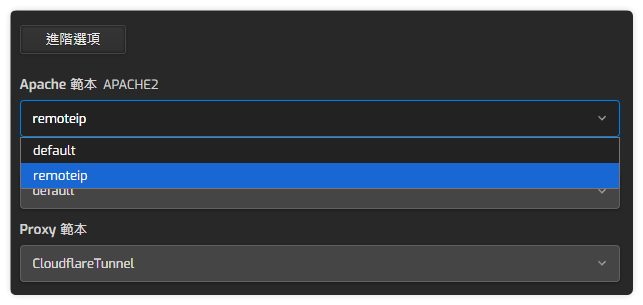
cp /usr/local/hestia/data/templates/web/nginx/default.tpl /usr/local/hestia/data/templates/web/nginx/CloudflareTunnel.tpl

cp /usr/local/hestia/data/templates/web/nginx/default.stpl /usr/local/hestia/data/templates/web/nginx/CloudflareTunnel.stpl
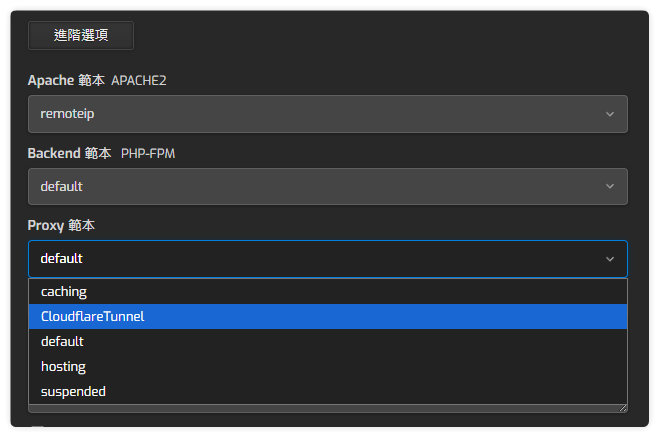
分別編輯 CloudflareTunnel.tpl 和 CloudflareTunnel.stpl 在 location / { 區段內加上如下內容
location / {
                proxy_pass http://%ip%:%web_port%;
                proxy_set_header Host $host;
                proxy_set_header X-Real-IP $http_cf_connecting_ip;
                proxy_set_header X-Forwarded-For $http_cf_connecting_ip;
                proxy_set_header CF-Connecting-IP $http_cf_connecting_ip;
                proxy_set_header X-Forwarded-Proto $scheme;
                proxy_set_header X-Forwarded-Host $host;
                proxy_set_header X-Forwarded-Port $server_port;
        }
重新載入您的網站,然後檢查容器內的網站日誌檔案:
incus exec HestiaCP -- tail /var/log/apache2/domains/your-wp.webspots.org.log如果日誌顯示的是您的外部 IP (例如 220.133.x.xxx),而不是內部 IP (10.10.10.1),則配置成功!